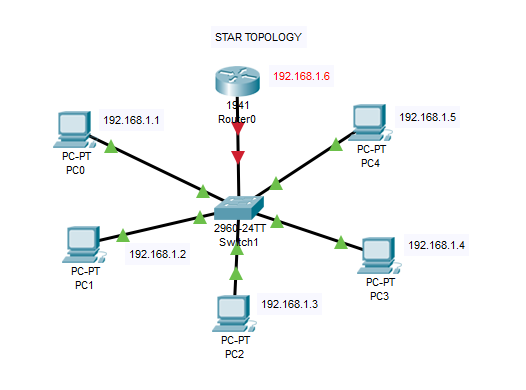
STAR TOPOLOGY
Steps to Implement :
- Connect 5 PC’s to a switch through fast ethernet cables and connect the switch to a router using a Gigabyte ethernet cable.
- Assing an IP to all the PC’s i.e
- PC 0 – 192.168.1.1
- PC 1 – 192.168.1.2
- PC 2 – 192.168.1.3
- PC 3 – 192.168.1.4
- PC 4 – 192.168.1.5
3. Configure the router :
Router>enable
Router# configure terminal
Router(config)#hostname R1
R1(config)#interface gig0/1
R1(config-if)#ip address 192.168.1.1 255.255.255.0
R1(config-if)#exit
R1#configure terminal
R1(config)#line console 0
R1(config-line)#password cisco
R1(config-line)#login
R1(config-line)#exit
R1(config)#enable password cisco
R1(config)#hostname harsh
harsh(config)#exit
harsh#write
harsh#show startup
another method ,
harsh#show startup
harsh# copy running -config startup -config
when the router starts , it boots up with the file name startup config with all saved configurations .
 Computer Networking